
Rutba Office 2.6 to 2.16: choose your apps, talk to your contacts, open files from the 1980s
In two days Rutba Office grew to thirteen apps and let you choose which ones you keep. Talk brought messages and calls, Worksheets learnt Lotus 1-2-3, dBASE and Access, and Mail’s Out of office now runs at your mail server.
· 6 min read

Rutba Office published ten releases on 21 and 22 October, from 2.6 to 2.16.1. Four numbers in between, 2.7, 2.9, 2.10 and 2.11, were never published: their checks before release did not pass, and their work went out in the next release that did. The suite grew from eleven apps to thirteen. Data Files, the thirteenth, has a post of its own; this one covers everything else.
Choose your apps
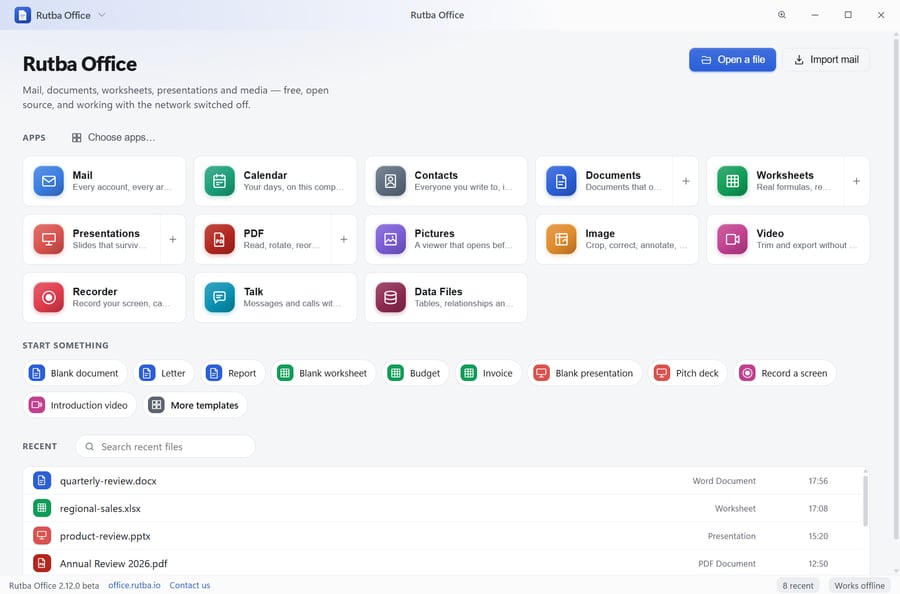
Thirteen apps is more than most people need on one screen, so 2.6 put a Choose apps button on the launcher. Turn an app off and its tile, its templates and its place in the template gallery go, and on Windows it stops opening its kinds of file, which go back to whatever opened them before. Turn it on again and Office takes back only the kinds of file nothing else has taken since.
Since 2.8 a new copy starts with the Office apps: Mail, Calendar, Contacts, Documents, Worksheets, Presentations, PDF and Pictures. Image, Video, Recorder, Talk and Data Files are a click away in Choose apps. A copy that ran before keeps every app it had, and the installer’s Choose apps page opens on exactly the apps you use. Since 2.20 the installer writes only the apps you tick.
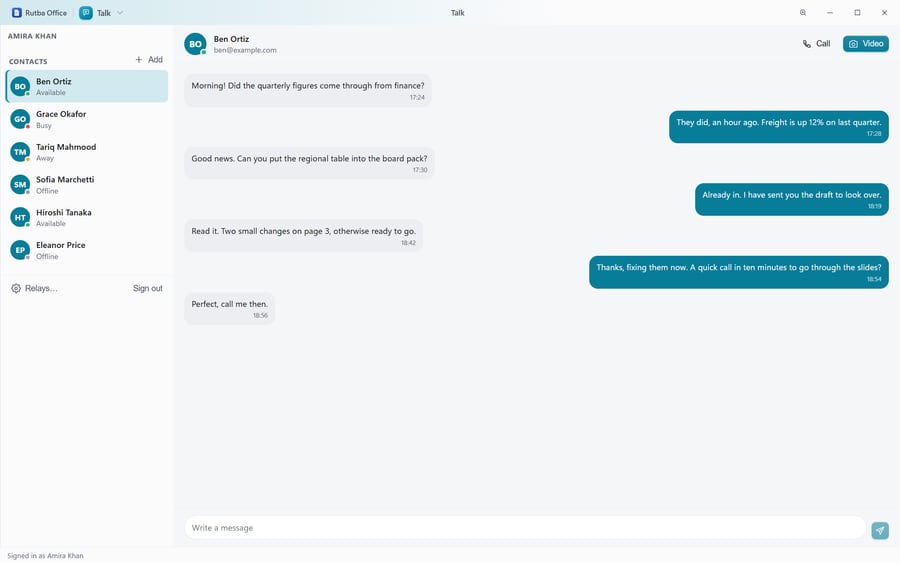
Rutba Talk, the twelfth app
Talk is for messages and calls with your contacts. Someone becomes a contact once both of you have said so. A call goes straight between the two computers where it can, or through a relay where they cannot reach each other, and shows a safety code both of you can read out to check that nobody is in the middle. Messages pass through a small Rutba service, which introduces you and holds each message until the other person’s app has it.
Talk is also the one app in the suite that signs in, because it connects you to other people and has to know who you are. Sign in with Rutba opens your browser at auth.rutba.io, where you sign in with a free Rutba account; your password stays with the browser and auth.rutba.io. Every other app works with no account at all.
- Invitations (2.13). Adding someone by their address can tell them by email, sent from your own address through Mail or from Rutba’s no-reply address in your name, a few a day. Or make a link and send it any way you like, or show it as a code a phone camera reads. A friend without Rutba Office accepts on the link’s page with a free Rutba account.
- Remove and block (2.16). A contact’s menu takes them off your list, and Block also stops them asking again. An invitation you sent can be withdrawn, or sent once more a couple of days later.
Spreadsheets and databases from before Excel
Current versions of Excel no longer open Lotus 1-2-3 files, and plenty of businesses still have them, along with dBASE tables and Access databases nobody can open any more. Since 2.8, Worksheets opens them:
- Lotus 1-2-3. A .wks or .wk1 opens with its labels, number formats, column widths and named ranges, and its formulas work again: @SUM, @IF, @VLOOKUP and the rest become the spreadsheet’s own. A .wk3 or .wk4 opens with each sheet in a tab and its formulas as the values 1-2-3 last worked out.
- dBASE and FoxPro. A .dbf opens as a sheet with a row for each record, dates as dates, and memo fields read from the .dbt or .fpt beside it. Deleted records are left out and counted. dBASE II and dBASE 7 tables open too since 2.12.
- Access, read only. An .mdb or .accdb opens with a sheet for each table. A database with a password is refused with what to do about it.
- SYLK and DIF, the old exchange formats, open with their values.
Each opens as a workbook to save as .xlsx, and Data Files can import any of them as tables of its own. How to open old Lotus 1-2-3, dBASE and Access files goes through every way of doing it, other programs’ included.
- Out of office at your mail server (2.14). Where the server allows it, Out of office turns on the server’s own automatic reply, so it keeps answering with your computer off. Rutba’s mail server offers it, as do most that run Dovecot. Your own filters keep working, and where the server cannot do it, Office sends the replies itself while it runs, and says so. It never does both.
- A Safety switch (2.8) on each message. With Safety off you can copy a link or a picture, and View source shows the message exactly as it came.
- Writing where you want (2.12). A new message opens in the reading pane, expands to the whole window, or pops out into a window of its own, keeping its words and attachments as it moves.
- Manage accounts (2.16) lists every account with its signature, its Out of office and Remove, which asks whether to keep the mail stored on this computer.
Out of office set at the mail server, so replies keep going with the computer off.
Calendar, Video and the editors
- Calendar (2.14) draws an event over several days as one bar across them, and the list of the next thirty days says which day of it each one is.
- Video (2.8) has a library beside the preview, four starters that play at once on stand-in pictures, volume in decibels with a limiter, speed changes that keep a voice’s pitch, Freeze Frame, Reverse, and a preview on a second screen.
- Presentations and Worksheets (2.12) format the words you select rather than the whole box or cell, and Worksheets keeps an .ods file’s formatting when it saves one.
- Every app (2.13) opens on New, its starter templates and the files you opened in it lately.
Templates that keep up to date
The templates moved to a public repository of their own in 2.13, Rutba-Office-Templates, and since 2.15 the update check that looks for a new Rutba Office also looks for a newer set of them. A set is used only when Rutba’s signature on it checks out, from the next start, so nothing changes under an open window. A database made from one of Data Files’ templates is offered the newer design, with its records and your own changes kept. Every template links to its own page on office.rutba.io/templates.
The release that opened an empty profile
2.15.0 asked Windows for its profile folder a moment before it had named itself, and so opened a new, empty profile. Mail accounts and settings looked gone. Nothing in anybody’s own profile was changed or removed, and 2.16.0 opened it again the same day. A test now starts Office’s first step in a real copy of its runtime and checks which profile it lands in, so the fault cannot come back unnoticed. Anything set up while 2.15.0 ran is in the folder it opened by mistake, left as it was.
Download Rutba Office
Thirteen applications for Windows, free under the AGPL, with no telemetry, and no account except for Talk.
Download

